
Discord Coding Status
Real-time Discord Rich Presence for Codex and Claude Code, powered by a local-first daemon with lifecycle hooks and optional quota display.
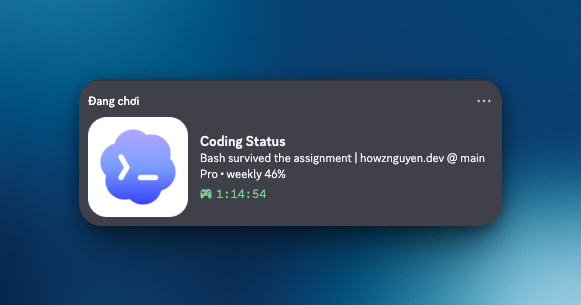
Discord Coding Status keeps Discord Rich Presence in sync with active Codex and Claude Code sessions through a small daemon running on your computer.
It combines Codex lifecycle hooks with process detection, adds sanitized project context and optional Codex quota information, then publishes the result through Discord Desktop's local RPC connection. It is not a Discord bot and does not require a bot token, public server, or cloud relay.
What it shows
The default detail level displays the current activity, repository name, branch, Codex plan, and remaining usage windows. You can switch between three privacy levels:
safeshows only the current activity.projectadds sanitized project, branch, and quota information.fullalso includes the package name.
Full filesystem paths, prompt text, account emails, secrets, repository URLs, and raw commands are never used as Rich Presence text.
How it works
- Codex lifecycle hooks publish session changes immediately. Process detection keeps Codex App and Claude Code sessions visible when native events are unavailable.
- The daemon sanitizes project metadata and optionally reads Codex quota information from the configured local source.
- Activity is sent to Discord Desktop through its local IPC/RPC connection.
- File watching and a polling fallback keep the status current across long-running sessions.
Codex and Claude Code use separate Discord application identities. When both tools are active, the daemon updates both clients and Discord decides which activities appear in the interface.
Key features
- Real-time updates from Codex hooks with process polling as a fallback
- Support for Codex CLI, Codex App, and Claude Code
- Optional Codex plan and remaining-quota display
- Automatic startup through a LaunchAgent on macOS or a Scheduled Task on Windows
- Local state storage with sanitized metadata and configurable privacy levels
- Integration and stress tests that run without an active Discord session
Quick start
Discord Desktop and Node.js 18 or newer are required. Install the daemon and its startup entry with:
When Codex hooks are installed, open Codex and review them before trusting the integration:
Verify the installation and start a Codex or Claude Code session:
macOS and Windows have managed startup support. Linux users can run the daemon manually with npx discord-coding-status daemon.
Local-first privacy
Session state stays on your computer. Discord receives only the short, sanitized Rich Presence strings selected by the configured detail level. There is no public HTTP listener, hosted backend, or telemetry service.
Optional quota lookup reads local Codex authentication data only for the configured OpenAI usage source. Tokens are never included in the Discord activity payload, and quota lookup can be disabled independently.
Open source
Discord Coding Status is released under the MIT License. Install it from npm, read the documentation, or contribute on GitHub.